How to talk to Lovable.
A prompt is the new design brief. Not code, not a mockup, just a sentence that kicks off a website. Here we'll look at the anatomy of a prompt, ten concrete tips, the typical mistakes, and one real example.
The five layers of a good prompt.
Build a landing page for a yoga studio (goal),
for new moms and beginners (context),
warm earthy palette, Aesop / Stoa vibe (style),
class schedule, booking by email, instructor bios (features).
Two instructors: Petra (hatha) and Bori (vinyasa) (content).
What I've learned.
- 01
State the goal, not the solution
"A page where photographers can introduce themselves to clients" beats "build a navbar with a logo and three menu items."
- 02
Give context on who it's for
"For the local market, for middle-aged guests" or "For an indie developer audience, in English." That's what shapes the tone and the visuals.
- 03
One reference beats a thousand words
"Linear style, dark background, lots of whitespace." Naming actual brands or sites narrows the interpretation dramatically.
- 04
Ask for one thing at a time
Don't cram the hero, payments, and a blog into a single prompt. Go step by step, that way it's much easier to undo.
- 05
Say it out loud when something's off
"These buttons are too loud." "That serif font doesn't fit." Lovable loves honest feedback and learns from it fast.
- 06
Provide real sample content
If you have three real products, three real testimonials, three real services, paste them in. It'll look far better than Lorem Ipsum.
- 07
Call the style by its name
"Editorial magazine", "brutalist", "glassmorphism", "neumorphism", "swiss minimal", these words translate into concrete design choices.
- 08
Say what it should NOT do
"No stock photos." "No purple-indigo gradient." Negative instructions are often more effective than positive ones.
- 09
Iterate in small steps
Ten tiny tweaks beat one giant rewrite. Lovable keeps versions, so you can always roll back to any of them.
- 10
Trust the chat
You don't need to be technically precise. "Make it smaller", "be bolder", "less text", these are all valid instructions.
One sentence, one website.
One of my first Lovable projects was exactly this, a single message typed into the chat window:
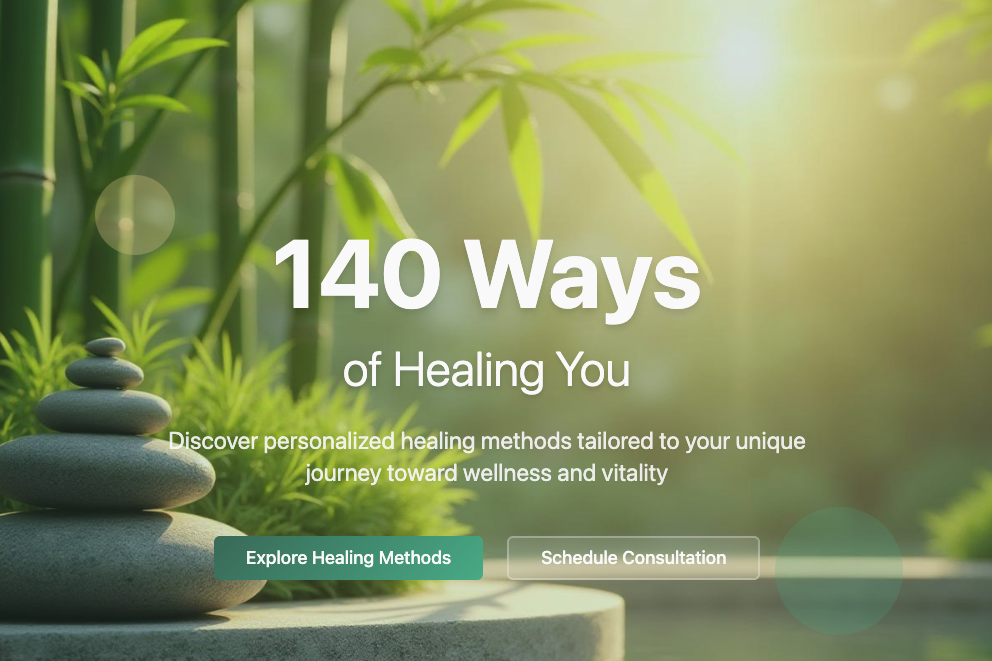
“I need a website for this plan: We have 140 ways of healing you. Interested?"
That's it. A one-sentence concept. It turned into a surprisingly poetic, usable site you can see live right now:
See it live →Sometimes a single evocative sentence is enough, if it's already a concept on its own. "140" + "ways" + "healing" are three words that give you structure (it becomes a list) and an emotional tone (gentle, whole) at once. Try it: do you have a title that's already a story by itself?
What not to do.
- ✕Everything at once: "landing page + blog + shop + auth + email", break it down instead.
- ✕Too vague: "build a nice site for a company", what company? for whom? selling what?
- ✕Contradictory instructions: "minimalist, but colorful and packed with elements", pick a lane.
- ✕No feedback: restarting the whole conversation instead of just saying what to change.
The first version is never finished.
With Lovable, generating is just step zero. 80% of the work happens in the chat: small, specific tweaks where you check the preview after every reply. If something breaks badly, you can go back to an earlier version. Don't be afraid to experiment, there's no such thing as "ruining it", only learning.
So you don't burn credits for nothing.
Small habits you'd otherwise pick up the hard way. I collected them here so you can start with good habits right away instead of learning them yourself.
- 01
Plan before you prompt
Jot down first what you want: pages, sections, main features. A thought-out one-page brief burns 10x fewer credits than scrambling as you go.
- 02
Use Chat mode to explore
Chat mode doesn't write code, it just talks. Perfect for thinking through a structure or a bug together before a single line changes. Thinking out loud is free.
- 03
One message, one topic
Don't bundle "fix the hero, add a new footer, change the colors, and build a contact form." Separate messages are far more precise and cheaper.
- 04
Shift+Enter for a new line
Enter sends the message. If you're writing a longer, structured prompt (a list, multiple paragraphs), use Shift+Enter to break lines. One well-structured prompt beats three rushed ones.
- 05
Stop it if it's heading the wrong way
If you see it's misunderstood you, don't let it run to the end. A Stop button appears during generation, click it and rewrite the prompt. An interrupted run only costs a fraction of a credit.
- 06
Say it out loud when something's off
Don't start over in a new project. Tell it in chat what's wrong ("the hero feels cluttered, remove two elements"), so it builds on existing work instead of starting from zero.
- 07
Use the version history
Every generation creates a version. If something breaks, click back to an earlier one instead of trying to "prompt your way" back to it. Reverting is free, patching isn't.
- 08
You can upload an image as a reference
A screenshot, a mockup, or a hand-drawn sketch says more than five paragraphs of description. Drop it in the chat and reference it: "I want a layout like this."
- 09
Ask it to explain itself
Before accepting a bigger change, ask: "what are you about to do, and why?" Often it catches its own misunderstanding while explaining the plan, and so do you, before it's too late.
- 10
Turn on Cloud when you need it
Database, login, file uploads, AI features: the built-in Lovable Cloud gives you all of that, no separate sign-up. Don't spend weeks building your own backend if it's one click away.
- 11
Keep components small
If a file grows past 500+ lines, ask it to split it up. It works more precisely on smaller components, with fewer misunderstandings and less back-and-forth fixing.
- 12
Use knowledge / project settings
In the project settings you can set persistent context (tone of voice, brand colors, target audience). You won't need to repeat it in every prompt, it's taken into account automatically.
- 13
Publish means going live with one click
Top right, the "Publish" button. The first time you get a free subdomain (yoursite.lovable.app), later you can connect your own domain too. Changes can go live automatically if you ask for it.
- +1 BONUS
Save every good prompt
Open a notes app (Notion, Apple Notes, anything), and collect the prompts that worked. In two weeks you'll have your own mini library you can copy-paste into new projects. That's worth more than any prompt-selling course.
Ship it live, and share it.
Once you like what you see, there are only two things left: publish the site with one click, then send the link to whoever you'd want to show it to.
Top right, the Publish button. One click, and your site is live at `yoursite.lovable.app`. You can connect your own domain later too.
Copy the link and send it in a message, an email, or post it. Your first website, the one you built yourself, is now on your friends' screens.
Let's see real examples.
Real prompts, real results, live links. See what you can get out of a single well-crafted sentence.